
Pronto - San Diego
San Diego MTSTravel & Local
4.51.74K Reviews
- Version
- 4.134.0
- Installs
- 500.00K
- Age Rating
- Everyone
Screenshots
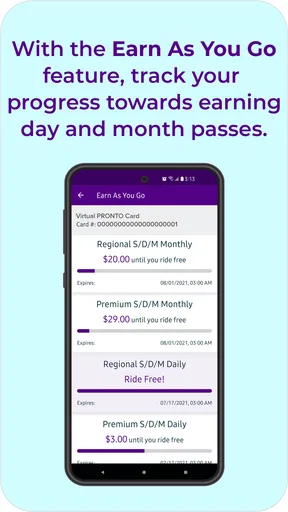
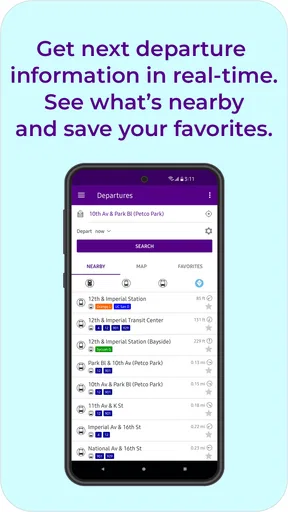
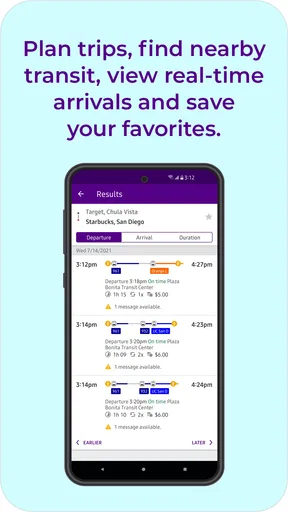
Our Review of Pronto - San Diego
 Analysis by Appyee
Getting around San Diego by bus or trolley is simple in theory, but paying the fare at the right moment can become awkward when you are standing at a stop, carrying bags, or trying to catch a connection. I tested Pronto as a mobile fare app for MTS and NCTD, and my overall impression is that it is most useful when it becomes part of my travel routine rather than something I open only after I am already rushing. It is free, aimed at Everyone, and developed by San Diego MTS, so its purpose is very focused: helping riders handle local transit fares from a phone.
The app sits in the Travel & Local category and has built a strong audience, with more than 500 thousand installs and a 4.5 average from about 4.5 thousand ratings. Those figures suggest that it has become a familiar option for San Diego riders, but they do not remove the need to look at how it behaves in real situations. A fare app is judged less by its feature list than by what happens when the signal is weak, the battery is low, or the vehicle is arriving sooner than expected.
How Pronto fits into a real San Diego trip
My first recommendation is to set it up before leaving home, while the connection is reliable and I have time to read each screen. That small habit changes the experience considerably. When I wait until I am already at a station, I am more likely to be distracted by arriving vehicles, other passengers, or a phone that is struggling to connect. Preparing ahead also gives me a chance to check that I am using the right account or fare arrangement before the trip begins.
In a normal weekday scenario, I might walk from an apartment to a trolley stop, buy or manage my fare through Pronto, and then continue without stopping at a separate sales point. On the return journey, the value is even clearer if I am tired or carrying groceries. I do not need to make the fare process the main event of the trip. The app is at its best when it removes a small piece of friction from a journey I already understand.
That convenience is particularly relevant for people who use both MTS and NCTD services. Instead of treating every part of a route as a separate payment problem, I can use one transit-focused tool for the systems it supports. This does not mean every possible trip becomes effortless; route planning, service changes, and station conditions still matter. Pronto’s role is narrower and more practical: it handles the fare side of the experience.
Why the connection matters before boarding
Connectivity has an outsized effect on any mobile ticketing workflow. A good signal lets me open the app, move through the relevant screens, and complete the action without thinking about the phone itself. A poor signal turns the same process into a question: did the request go through, should I try again, or am I about to create a duplicate transaction?
I would not make Pronto the first thing I handle after a vehicle appears. My preferred workflow is to prepare the fare before walking to the platform or stop. If I know I will travel later, I deal with the app at home or somewhere with dependable service. This is not a criticism unique to Pronto; it is a sensible rule for any fare app whose important actions depend on communication between the phone and the service.
The practical lesson is that a strong mobile connection is not merely helpful during setup. It can also affect confidence at the moment of boarding. When the screen takes longer than expected, I want clear confirmation rather than guessing. If I am in an underground or crowded area, I give myself extra time instead of assuming the app will behave exactly as it did in my living room.
Using it while moving around the city
Pronto makes the most sense for riders who already carry a phone throughout the day. Commuters, students, visitors staying in San Diego, and occasional riders who dislike handling cash can all benefit from having the fare process close at hand. I also see value for someone whose travel pattern changes during the week, since a phone-based option is easier to adapt than planning every ride around a staffed sales location.
Visitors should still separate fare management from navigation. A transit fare app is not automatically a complete city guide, and I would not rely on one screen to answer every question about directions, arrival times, or disruptions. I use Pronto for the payment and fare task, then use whichever route information I trust for the rest of the journey. That division keeps expectations realistic and makes the app easier to understand.
There is also a social advantage in a busy setting. If I have already completed the necessary steps, I can avoid blocking a machine or holding up someone behind me. That matters at popular stops, especially when a group is trying to board together. The trade-off is that the phone becomes part of the travel equipment: a dead battery, a damaged screen, or an inaccessible account can be more inconvenient than a physical alternative.
The small habits that make mobile fares less stressful
I found three habits especially useful. First, I prepare before reaching the stop rather than treating the platform as a workspace. Second, I keep the phone easy to reach, because searching through a bag while a vehicle waits adds unnecessary pressure. Third, I check the result of an action once and avoid repeatedly tapping when the network is slow. Repeated attempts may not improve the connection and can make it harder to know which action succeeded.
A fourth habit is to think about the whole day, not only the first ride. If I expect several trips, I consider my battery level and whether I will have a chance to recharge. A fare tool can be convenient and still be a poor fit if my phone is nearly empty before the return journey. For occasional travel, I would make sure I understand the available physical alternatives in advance rather than discovering that limitation at the busiest point of the day.
These are not flashy features, but they are the details that determine whether the app feels dependable. Pronto rewards preparation. It is less forgiving when I open it for the first time in a hurry, with weak reception and no clear idea of what I need to do.
What happens when the network or app experience falters
The most important limitation is the uncertainty that comes with connectivity. If a fare action is slow, I may not immediately know whether the problem is the network, the phone, or the service itself. That uncertainty is uncomfortable when boarding time is close. I would rather wait a moment and look for a definite status than assume that a second tap is harmless.
My recovery approach is simple: stop tapping, move to a place with a better signal if the situation allows, and give the app enough time to finish. If the trip is urgent, I use the transit system’s available alternative rather than letting a frozen screen make me miss the vehicle. This is one reason I would not describe Pronto as a complete replacement for every other fare method. A backup plan is sensible, particularly for an unfamiliar route or an important appointment.
Account access can create a similar problem. If I change phones, sign out, or forget the details needed to return to the app, the inconvenience appears at exactly the wrong time. I recommend checking access before a travel day and avoiding last-minute setup. The app is free, but the cost of depending on it is measured in attention, battery, and time when something goes wrong.
Recovery is easier when I treat the app as one part of the trip rather than the entire trip. I keep the route and stop information separate, leave a little boarding time, and do not assume that a mobile transaction will always be instant. That approach makes a connectivity problem manageable instead of turning it into a missed connection.
Using Pronto without wasting mobile data
For most riders, the fare actions themselves are unlikely to be the main source of mobile-data concern; the bigger issue is using several travel tools at once. Maps, route searches, web pages, and media can all compete for the same connection while I am moving around. I therefore try to prepare the route and fare separately before leaving, then use the phone only for the task that matters at the stop.
On a limited data plan, I would avoid repeatedly refreshing screens simply because a page feels slow. I also would not open other heavy apps while waiting for a fare action to complete. The sensible workflow is to close distractions, give Pronto a clear chance to respond, and keep the phone available for confirmation. This reduces both data use and confusion.
There is a trade-off here. Preparing early is efficient, but it may not answer every question about a changing journey. I still need to pay attention to announcements and the conditions around me. Pronto can support the fare part of a trip, yet it cannot replace awareness of the physical network. If a route changes or a station becomes crowded, a rider who is staring only at the phone may miss useful information.
People who travel frequently may appreciate the routine of a dedicated fare app more than someone who takes one unfamiliar ride. For a rare visitor, a physical purchase option or direct assistance may feel easier if the app setup becomes confusing. The best choice depends on whether the convenience of carrying the fare on a phone outweighs the responsibility of keeping that phone connected, charged, and accessible.
Who should use it, and who may prefer another option
I would recommend Pronto to regular MTS or NCTD riders who want a central mobile way to handle fares and are comfortable preparing before travel. It is also a reasonable choice for people who dislike waiting at sales points or who want a fare workflow that travels with them. Its free price removes an obvious barrier to trying it, and its Everyone content rating makes it broadly approachable.
I would be more cautious recommending it as the only option for someone with unreliable mobile service, an older phone that struggles with current apps, or a routine that leaves no time for troubleshooting. It is also not ideal for a person who strongly prefers cash or a physical pass and does not want a phone involved in boarding. In those cases, the usual non-phone fare method may be less elegant but more comfortable.
Compared with a general navigation app, Pronto has a narrower purpose and a clearer transit-fare focus. A maps app may be better for discovering routes, walking directions, and nearby places, while Pronto is the tool I would open when the question is how to handle the MTS or NCTD fare. Compared with relying on a ticket machine or sales location, the mobile approach can save a stop, but it introduces dependence on the phone and network. Neither option wins in every situation.
Current polish and long-term confidence
The app was released on August 12, 2021, and the current version is 4.134.0. I read that as a sign that Pronto is an actively maintained part of the local transit experience, although version numbers alone do not guarantee that every moment will be smooth. What matters to me is whether the app remains understandable when I am tired, distracted, or dealing with a weak connection.
The audience response is encouraging: around 1.7 thousand written reviews sit alongside the broader rating activity. I would still treat public feedback as a useful signal rather than a promise. Transit conditions vary by device, location, carrier, and timing, so my experience may not match every rider’s. The strongest reason to try it is not the rating itself but the clear fit for people who regularly use the supported San Diego services.
The minimum operating requirement is Android 8.0, which is worth checking before planning around the app. That detail matters for anyone using an older handset or a spare phone for travel. If the device is compatible, I would install and configure Pronto while connected to a stable network, then test the basic workflow before depending on it for an early appointment.
My connectivity verdict
Pronto is a useful, focused fare companion for San Diego transit, especially when I prepare before leaving and keep a realistic backup plan. Its biggest strength is convenience: MTS and NCTD fare handling can live on the phone I already carry. Its biggest weakness is the same thing that enables that convenience. When the connection, battery, device, or account access becomes unreliable, the fare process can become stressful.
I would recommend it to a regular rider who wants to reduce small payment hassles and is willing to build a few habits around connectivity. I would not tell a visitor to ignore every physical alternative, nor would I use it blindly in a rush with a nearly empty battery. Used thoughtfully, it makes mobile travel feel more organized. Used without preparation, it can make a simple boarding moment feel more complicated than it needs to be.
My final view is that Pronto is worth trying when your San Diego trips regularly involve MTS or NCTD and your phone is a dependable travel tool. It is free, focused, and supported by San Diego MTS, but its convenience works best when I treat network access and battery life as part of the fare plan. That honest trade-off is easy to manage, and for the right rider, the time saved at the stop can make the app a genuinely practical part of everyday travel.
Verdict
Strengths of Pronto - San Diego
- Quickly locate nearby MTS buses, trolleys, and stops.
- Real-time arrival estimates help reduce waiting uncertainty.
- Trip planning supports routes across San Diego’s transit network.
- Service alerts can warn about delays, detours, and disruptions.
- Useful for comparing public transit options before leaving.
Limitations of Pronto - San Diego
- Arrival predictions may be inaccurate during traffic or service disruptions.
- Coverage and features depend on participating San Diego transit agencies.
- Some route details can feel difficult to understand at first.
- The app is less useful for users who rarely use public transportation.
- Location access and notifications may affect battery usage.
Similar Picks in This Category
View All
Google Maps
Google LLC3.4

Google Maps Go
Google LLC4.1

Booking.com: Hotels & Travel
Booking.com Hotels & Vacation Rentals4.8

Google Earth
Google LLC3.8

Skyscanner Flights Hotels Cars
Skyscanner Ltd4.8

trivago: Compare hotel prices
trivago N.V.4.4
Frequently Asked Questions
What is Pronto - San Diego, and what can I use it for?
Pronto - San Diego is the official mobile app for the region’s public transportation system. After installing it, you can use it to plan trips, check routes and schedules, view service information, and manage certain transit-related features from your phone. It is designed to make traveling around San Diego easier, whether you regularly use buses and trolleys or are visiting the area for a short time.
Can I use Pronto - San Diego to pay for public transportation?
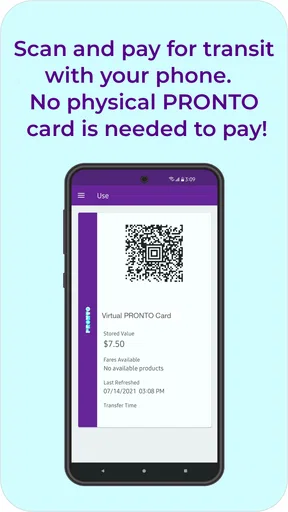
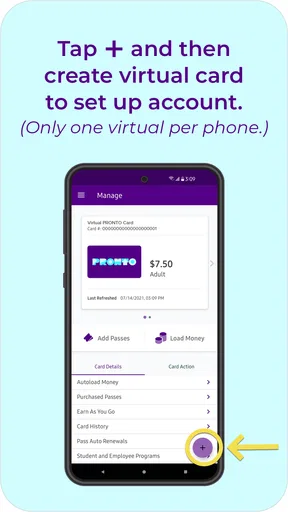
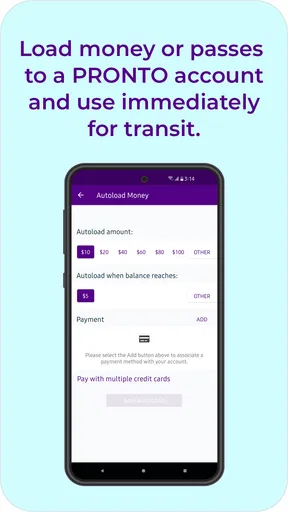
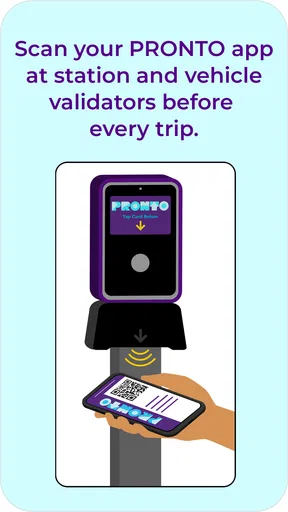
Yes, the app is built around the PRONTO fare system and can allow eligible riders to manage fares digitally. Depending on the current service and your device, you may be able to add funds, purchase passes, load a virtual card, or use mobile ticketing options. Before relying on it for an important journey, check that your account is set up, your payment method works, and your phone has enough battery.
Does Pronto - San Diego provide real-time arrival and service information?
The app can provide route details, scheduled departures, and, where available, real-time vehicle or arrival information. This is particularly useful when buses or trolleys are delayed, rerouted, or operating on a modified schedule. However, live data can occasionally be affected by GPS limitations, network problems, or incomplete agency updates, so it is sensible to confirm important travel plans through official service alerts.
Do I need an internet connection or a user account to use the app?
An internet connection is generally needed for features such as trip planning, refreshing schedules, receiving service updates, managing your PRONTO account, and processing payments. Some basic information may remain visible temporarily after it has loaded, but offline use should not be assumed. Certain functions may also require registration, including account management, stored payment options, or transferring fare products between devices.
Is Pronto - San Diego free, and is it available for both Android and iPhone?
Pronto - San Diego is normally free to download, although using public transportation still requires the applicable fare, pass, or account balance. The app is intended for both Android and iOS users, but supported operating-system versions can change over time. Before downloading, review the store listing for device requirements, permissions, recent updates, and user feedback to ensure your phone is compatible.
